Know where every Meesho rupee goes.
MeeshoCRM is a Meesho seller dashboard. It reads your orders, payments and returns straight from your Meesho supplier panel and turns them into one clear view: what you earned, what Meesho deducted, what's still unpaid and which products really make money.
Meesho shows numbers.
MeeshoCRM shows the story.
The supplier panel spreads your money across payouts, payment files, returns and deductions. Meesho payment reconciliation by hand takes hours of Excel.
"Why did I get less than I sold?"
Returns, RTO, shipping, fees, TCS/TDS, ads and recoveries are cut from your sales in different places.
"Which returns never came back?"
Meesho marks returns delivered, but some never reach you, and the window to claim them is short.
"Which products actually make money?"
A product with high sales can still lose money after returns and your own product cost.
Set up in 2 minutes. Then it runs by itself.
No API keys, no file uploads and no new password. MeeshoCRM works with the Meesho login you already use.
Add to Chrome
Install MeeshoCRM from the Chrome Web Store in one click.
Open Meesho
Log in to supplier.meesho.com as usual. MeeshoCRM recognises your supplier account.
Press Sync now
The first sync reads all your orders, payouts and returns in a few minutes, then refreshes every few hours on its own.
Act on it
See your money, chase unpaid deliveries and lost returns, and price your products for real profit.
See MeeshoCRM in 45 seconds
From installing to finding money Meesho still owes you.
Everything a Meesho seller needs to track
Where the money went
Gross sales → returns, shipping, Meesho fees, TCS/TDS, recoveries, ads → net settled, matched to Meesho's bank transfers.
Upcoming payouts
Every payout Meesho will send, with dates and amounts, plus each past settlement with its UTR number.
Issues to chase
Delivered but not paid, returns not received, pickups stuck, returns lost, recoveries deducted, each with where to raise it.
Meesho returns tracker
Every RTO and customer return with its stage. Tick it received, note its condition and track your claims.
SKU profit
Orders, deliveries, RTO % and settlement per SKU. Add your unit cost once and see real profit.
Customers & states
Repeat buyers and orders by state from the shipping labels you download, to see where you sell and where returns come from.
Multiple suppliers
Log in to another Meesho supplier and MeeshoCRM switches automatically, keeping each supplier's data apart.
All your computers
Your data is saved to your MeeshoCRM account, so it's ready on every computer you use.
Panel on the Meesho page
Key numbers in a small panel right inside the supplier panel, plus an Activity log of every sync.
Meesho seller dashboard: how to use each screen
Click a screen to see what it shows and how sellers use it every day.
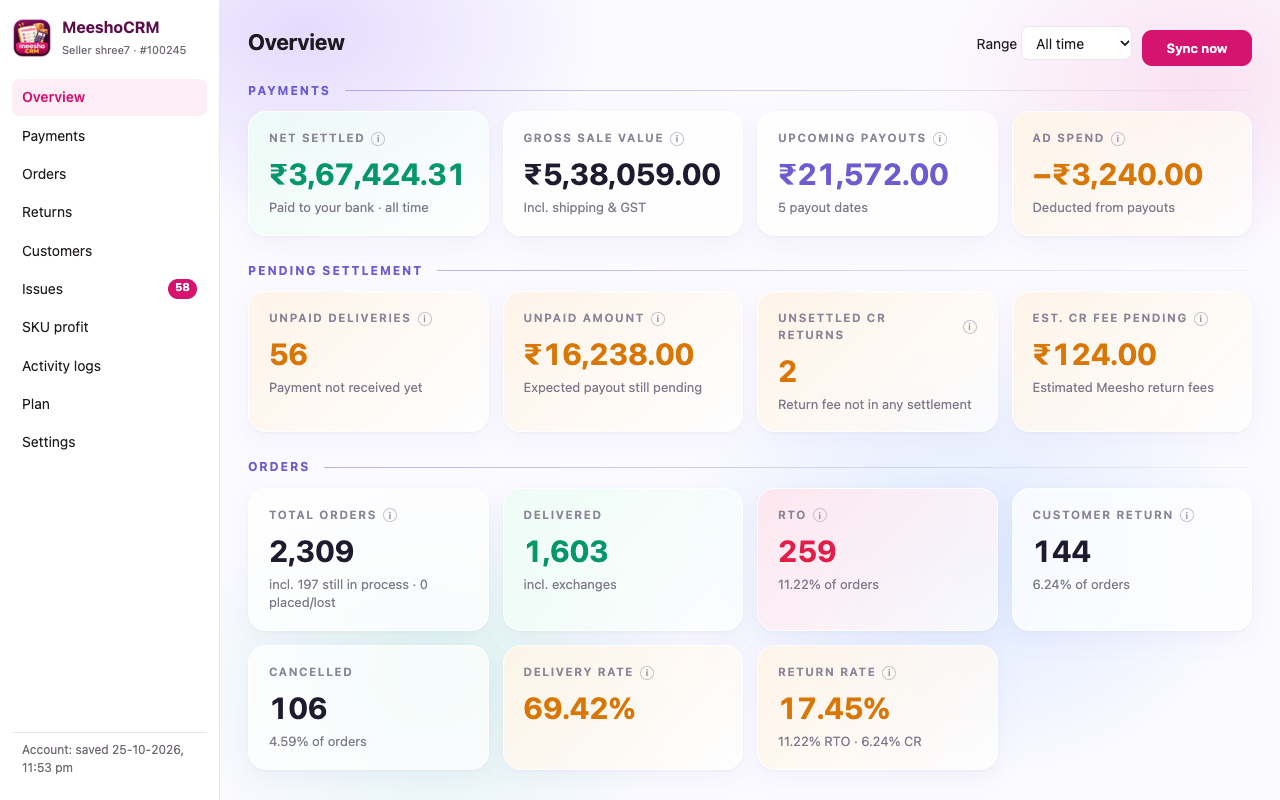
Overview
Your whole Meesho business on one screen: what you earned, what is still to be paid and how your returns look.
- Net settled and gross sale value
- Upcoming payouts with dates
- Orders, deliveries and return rates
Screens show sample data from a demo seller.
Spend less time in Excel, keep more of your money
Simple, seller-friendly pricing
Try everything free for 7 days. Continue for less than ₹4 a day.
Free trial
- Every feature unlocked
- Full sync of orders, payouts and returns
- No payment details needed to start
MeeshoCRM Monthly
- Unlimited orders, payouts and returns
- Issues to chase and SKU profit
- Multiple Meesho suppliers
- Saved to your account, on all your computers
- Renew early: new days add to the end of your plan
Payments are non-refundable. Please use the free trial before you pay. Refund policy
Questions Meesho sellers ask
Do I need to give MeeshoCRM my Meesho password?
No. MeeshoCRM works inside your own Chrome while you're logged in to supplier.meesho.com, using the login you already have. It never asks for or stores your password.
Do I have to download or upload any reports?
No. MeeshoCRM reads orders, payouts, returns and payment files directly from your supplier panel. Press Sync now once; after that it refreshes every few hours by itself.
I have more than one Meesho supplier account. Does it work?
Yes. When you log in to another supplier, MeeshoCRM switches to it automatically. Each supplier's data is kept completely separate.
Can I use it on more than one computer?
Yes. Your data is saved to your MeeshoCRM account, so it's available on every computer where you install MeeshoCRM and log in to Meesho.
What happens after the 7-day trial?
MeeshoCRM asks you to buy the ₹99 monthly plan, paid by UPI. Your data keeps syncing in the background, so everything is ready the moment your plan starts. Plans start at 12:00 am the day after your payment is activated.
Can I get a refund?
No. Payments are non-refundable, and we're not responsible for problems with your UPI app or bank. Please try everything during the free trial first. See the refund policy.
Is my data safe?
MeeshoCRM reads only your own supplier panel, never other websites or your browsing. Your data is stored on your computer and in your private MeeshoCRM account; only you can access it. It is never sold or used for advertising. See the privacy policy.
Is MeeshoCRM made by Meesho?
No. MeeshoCRM is an independent tool by Sarthi Tech for Meesho sellers. It is not made by, endorsed by or affiliated with Meesho.
Ready to see your Meesho business clearly?
Install MeeshoCRM, open your supplier panel, press Sync now. 7 days free.